
XTermium Download

All your sessions, in one window.

An open-source terminal and session manager, for you and your AI agents.

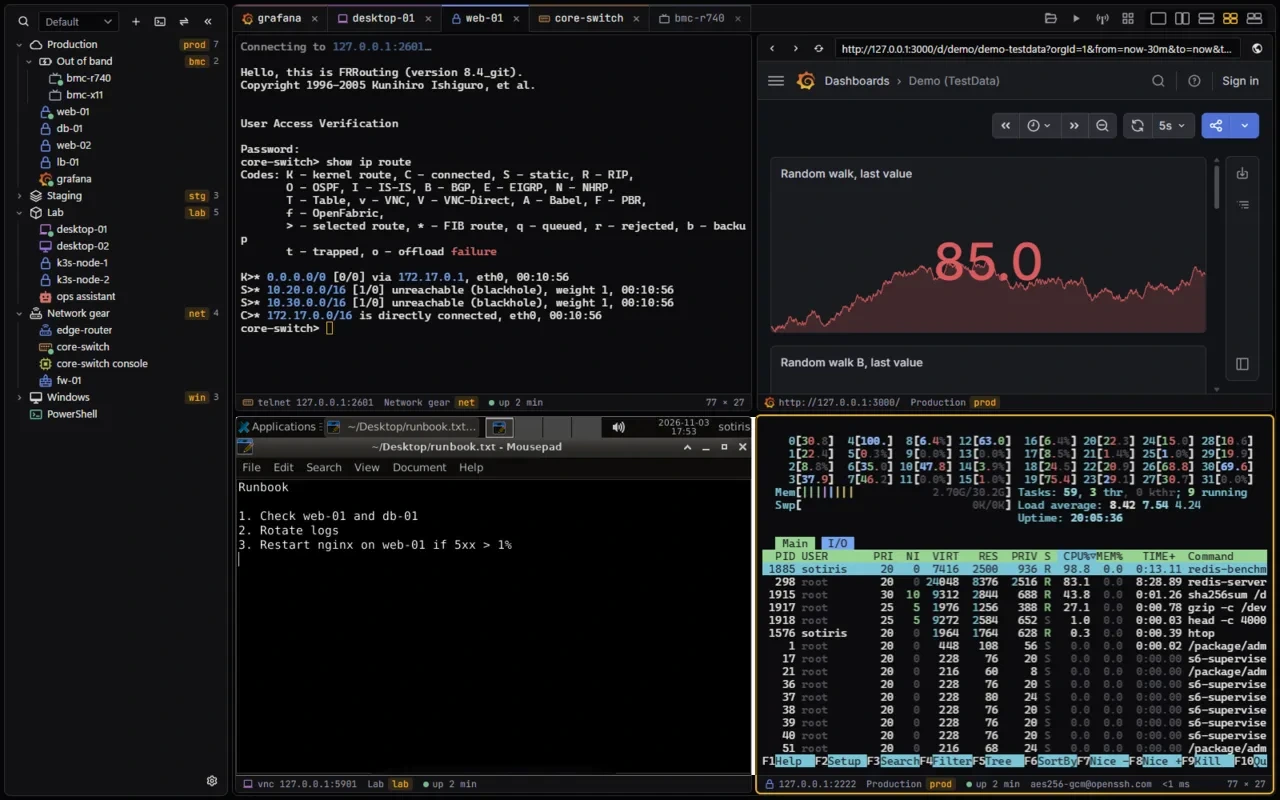
Out now for Windows, Linux and macOS. See the real screens

XTermium with four panes in one window: htop on web-01 over SSH, a Grafana dashboard in a web tab, core-switch over telnet, and desktop-01 over VNC with a runbook open; five tabs above them

What it is, in six lines.

  1. You have a lot of machines.

    Servers, switches, Windows boxes, a BMC or two.

  2. Each one wants its own program.

    SSH here, RDP there, a VNC viewer, a browser for the dashboard.

  3. XTermium puts them all in one window.

    Tabs and split panes for every kind. Type once into many terminals.

  4. Your logins stay locked.

    Encrypted on disk, with the key in your OS keychain.

  5. An agent can use it too.

    AI agents open sessions and read the output. They never see a password.

  6. And it is free.

    Apache-2.0, every connection type, every OS. Only sync and Terminal Co-op are paid.

Ten kinds of connection. One window.

  • SSHssh web-01
  • SFTPsftp web-01
  • RDPrdp build-win11
  • VNCvnc desktop-01
  • Telnettelnet core-switch
  • Serial and local shellPowerShell
  • WinRMwinrm dc-01
  • Websitesweb grafana
  • BMC consolesbmc bmc-r740
  • SSH tunnelstunnel web-01 nginx
  • Tabs and split panes, desktops and terminals together.
  • Type once into every ticked terminal.
  • Find anything by typing its name.
  • “What is using the CPU on web-01 and db-01?”

    1. sessions
    2. open web-01
    3. run
    4. read

    agentOpens your saved sessions, runs commands and reads the output.

  • “What is on bmc-r740’s console?”

    1. screenshot bmc-r740
    2. click
    3. type
    4. key

    agentSees desktops and BMC consoles as screenshots, then clicks, types and presses keys.

  • “Start the database tunnel.”

    1. tunnels
    2. tunnel_start

    agentStarts and stops saved SSH tunnels by name.

What you do, an agent can do.

Turn on Settings › MCP, then add XTermium to Claude Code, Codex, Gemini CLI or VS Code with one command.

  • Never sees a password.
  • While XTermium is locked, so are its tools.
  • Scripts get the same tools from the xtermium command line.
How agents work with XTermium

Encrypted on your disk, free for good.

One key in your OS keychain seals everything. A recovery passphrase brings it to a new machine.

  • Sealed with XChaCha20-Poly1305.
  • Apache-2.0: use it, change it, share it; keep the credit.
  • A Rust backend and a GPU-drawn terminal, native on every OS.
Your OS keychainCredential Manager, Keychain or Secret Service
One 256-bit data keyNever on disk in plaintext
Recovery passphraseBrings the key to a new machine
Sync serverStores ciphertext only

Out now for Windows, Linux and macOS.

One command installs the latest build and checks its sha256. Read install.ps1 or install.sh first.

WindowsWindows 10 and 11Latest release

irm https://xtermium.com/install.ps1 | iex

# or with Scoop

scoop bucket add xtermium https://github.com/xtermium/scoopscoop install xtermium/xtermium
  • .exeInstallersha256on GitHub
  • .msiInstaller, for managed deployment; the one Scoop installssha256on GitHub
  • .zipPortable, no installsha256on GitHub

Linuxx64Latest release

curl -fsSL https://xtermium.com/install.sh | sh
  • .debDebian, Ubuntusha256on GitHub
  • .rpmFedora, RHEL, openSUSEsha256on GitHub
  • .AppImageRuns on any distribution, no installsha256on GitHub

macOSApple silicon and IntelLatest release

curl -fsSL https://xtermium.com/install.sh | sh
  • .dmgOne universal app for bothsha256on GitHub

Not signed by Apple yet, so macOS blocks the first open of a .dmg from your browser: open System Settings › Privacy & Security, find “xtermium” was blocked to protect your Mac, and click Open Anyway. The command above isn’t blocked. Signing takes a yearly Apple Developer membership; sponsoring on GitHub helps pay for it.

Want what comes next before it is released? Nightly builds are XTermium as it stands tonight: newer than the release and less tested.