
SSH credentials, encrypted and shared across sessions.
XTermium keeps the logins your sessions use, the users, passwords and keys for SSH, RDP, VNC and WinRM, encrypted with a key in your OS keychain. It isn’t a password manager for websites and apps: it keeps what your connections need.
Store SSH passwords securely, on your own disk.
XTermium keeps the users, passwords and keys your SSH, RDP, VNC and WinRM sessions need on your own disk, encrypted. Everything it keeps is sealed with XChaCha20-Poly1305 under a random 256-bit data key, and that key lives in your OS keychain: Windows Credential Manager, the macOS Keychain or Secret Service on Linux. There’s nothing to type day to day. A recovery passphrase, with Argon2id, brings the key back on a new computer or after a reinstall; without it, a lost keychain entry means the files can’t be read. A password you keep in a shared login is typed once and picked by every session that uses it, and one XTermium remembers for a single host stays on this computer unless you choose to sync it. Agents and scripts never see either, and only the passphrase-protected .xtermium export carries shared logins.
Shared logins for SSH, RDP, VNC and WinRM.
A shared login is a user, password and key kept once and picked by any number of SSH, RDP, VNC and WinRM sessions, jump hosts and tunnels. Change the password once, and every session uses the new one. Open them from the command palette › Shared logins, or Manage… next to a session’s Login.
A login can carry an SSH gateway too: sessions that pick it reach their hosts through it, SSH, RDP, VNC and websites alike. Shared logins are stored encrypted with the sessions.
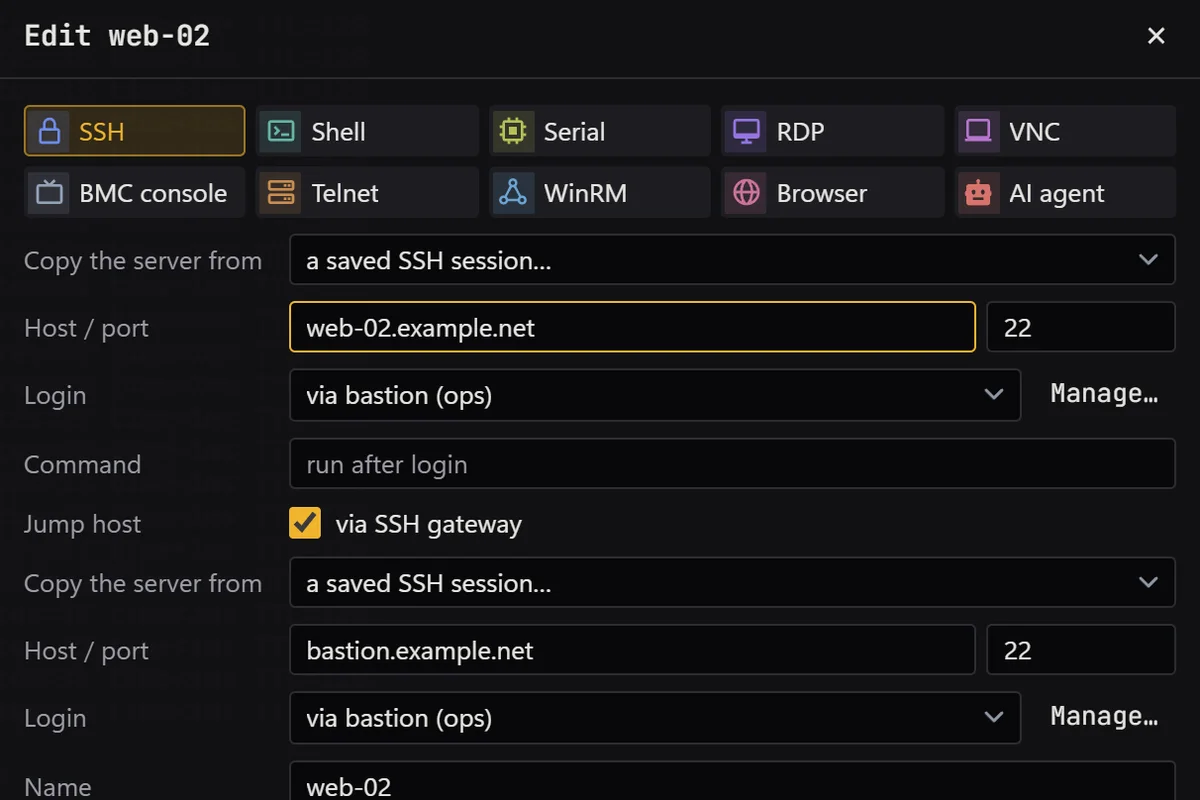
Saved logins, on this computer.
Don’t want a shared login for one host? Let XTermium remember the password when it asks. It goes into logins.xtm, encrypted, on this computer only, unless you tick “Saved logins and passwords” under Settings › Account and sync. Settings › Saved logins lists them, changes them and forgets them, and a WinRM password the host refuses is forgotten by itself.
A lock for when you step away.
Settings › Security sets what unlocks XTermium: a password, a PIN, a passkey (a security key or the computer’s own) or Windows Hello (face, fingerprint or Windows’ PIN). Locked, every window shows only the lock screen while your sessions keep running, and the MCP server and the command line refuse every tool.
- It locks when XTermium starts, with Ctrl+Shift+K or the lock beside Settings, and after the minutes you pick without input.
- Changing the lock takes an unlock first, and wrong passwords and PINs make the next try wait.
- The lock’s password and PIN are kept as Argon2id hashes, and the passkey as its public key, in lock.xtm.
Passwords stay out of agents and exports.
A password is used to sign in, and that’s all. These are the places it never goes.
- AI agents and scripts. They open a session by name and XTermium signs in; listing shared logins never returns a password. How agents work with XTermium.
- Exports. Shared logins go only into the passphrase-protected .xtermium file. Remembered passwords stay on this computer.
- Imports. Sessions come in from a bookmarks .ini without their stored passwords.
- The command line. A WinRM password reaches PowerShell in an environment variable it removes at once, never on the command line.
- A changed server. SSH host keys and RDP server keys are confirmed once; a changed key refuses the connection instead of asking.
An encrypted session manager, synced end to end.
Pro syncs your sessions, folders and workspaces, shared logins, tunnels, snippets, layouts and trusted host keys to every computer you own. Your settings, backgrounds and the passwords you chose to remember sync only when you tick them. Everything is encrypted before it leaves, and a new computer needs only your recovery passphrase.
Pro costs €2.99 a month or €29.99 a year, excluding VAT; checkout is in test mode for now. Without it, a passphrase-protected export moves sessions by hand. Restore points keep a full copy of everything on this computer each day and before each restore, the newest 10. Pricing.
Questions about credentials.
Is XTermium a password manager?
No. It keeps the logins your sessions use: users, passwords and keys for SSH, RDP, VNC and WinRM, and the logins your BMC and website sessions sign in with. It doesn’t store your website or app passwords; keep your password manager for those.
Where is the encryption key?
In your OS keychain: Windows Credential Manager, macOS Keychain or Secret Service on Linux. On disk there is only the key sealed under your recovery passphrase, in recovery.key.
What if I lose the keychain entry?
XTermium asks for your recovery passphrase and unlocks everything, on the same computer or a new one. Without the passphrase, a lost keychain entry means the files can’t be read, by you or anyone.
Can the sync server read my passwords?
No. Sync is end-to-end encrypted: everything is sealed on your computer before it leaves, and the server only ever holds files it can’t read. Remembered passwords sync only if you tick them.
Read next.
SSH client
SSH sessions, SFTP, jump hosts and tunnels, in tabs.
Read more about SSH clientRemote desktop
RDP, VNC, BMC consoles, WinRM and serial beside your terminals.
Read more about Remote desktopAI agents
A local MCP server and agent tabs that never see a password.
Read more about AI agentsAlternatives
XTermium next to MobaXterm, Termius, mRemoteNG, Royal TS and PuTTY.
Read more about AlternativesScreens
Every capture of the running app, with demo data.
See the screens about Screens
Get it for Windows, Linux or macOS.
Free and open source. One command fetches the latest build from GitHub, checks its sha256 and installs it; read install.ps1 or install.sh first. Every file and its checksum, Scoop included, are under Downloads, and the .msi, .exe, .zip, .deb, .rpm, AppImage and .dmg are in the latest release on GitHub. The macOS app is not signed by Apple yet: how to open it the first time.
WindowsWindows 10 and 11
irm https://xtermium.com/install.ps1 | iexLinuxx64: .deb, .rpm or AppImage
curl -fsSL https://xtermium.com/install.sh | shmacOSApple silicon and Intel: one universal .dmg
curl -fsSL https://xtermium.com/install.sh | sh